
Windows-native access
SMB3 and Active Directory connect Windows users and applications to the file layer.
AMAZON EFS. WINDOWS ACCESS. ROADRUNNER SMB.
Connect FSLogix profiles and Windows file shares to Amazon EFS through one SMB platform. Keep Active Directory integration and your files in your own AWS account.

A CLOSER LOOK AT ROADRUNNER
The login storm arrives in one short window. Size for that peak and the rest of the day is over-provisioned. Size for the quiet hours and login is under-provisioned. Explore the architecture and the administration tasks behind an EFS-backed Windows file service.
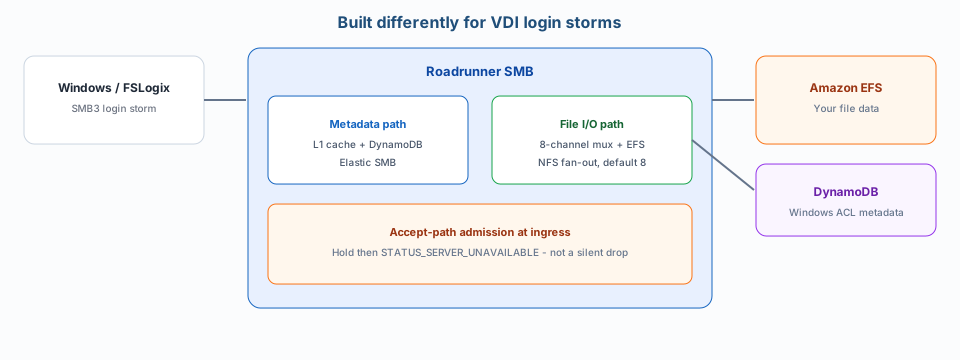
Windows accessSMB3 for Windows clients and FSLogix profiles.
Separate pathsMetadata handling and file-data I/O have different jobs.
Your AWS accountPersistent files remain in Amazon EFS.
PRODUCT WORKFLOW
Explore the documented product functions. This interactive overview describes the workflow; it is not a screenshot of the Admin UI.
Read the Admin GuideCLUSTER OPERATIONS
The Admin UI provides cluster-health visibility. Include operating procedures and failure behavior in your evaluation plan.
USAGE & DIAGNOSTICS
Review billing status and generate a Support Report from the Admin UI when investigating an operational issue.
EXPLORE THE PLANNING MODEL
Compare published planning configurations and see how instance size and node count affect the model. Supported production nodes are 2 through 8.
Planning guidance, not a service level. Two-node figures are HA-derated so the planned environment can continue on the surviving node. Validate your own FSLogix workload.
Read the sizing assumptionsSTORAGE THAT STAYS TOGETHER
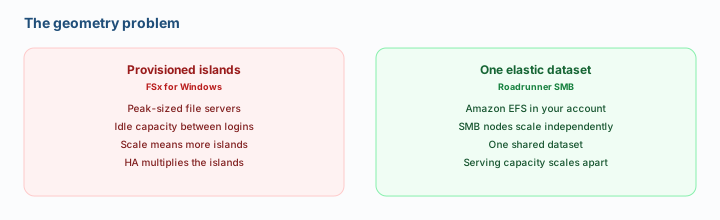
Explore the difference between adding storage islands and scaling an SMB layer over a shared EFS dataset.
THE WORKLOADS
FSLogix on AWS-hosted VDI is the workload Roadrunner is built to serve. Business file shares use the same EFS foundation.
DESKTOP PROFILES
This is the primary workload. FSLogix login and reconnect events concentrate storage activity into short windows on Amazon WorkSpaces, Citrix on AWS, and other AWS-hosted Windows VDI. Plan for that arrival so login behavior stays predictable.
Explore desktop workloadsBUSINESS FILE SHARES
A second workload on the same foundation. Home directories, departmental shares, and corporate files keep familiar Windows access, with persistent data in EFS and SMB serving planned separately.
Explore shared file storageTHE PLATFORM
A focused file-services platform for teams making deliberate choices about Windows storage on AWS.
Inside the architectureSMB3 and Active Directory connect Windows users and applications to the file layer.
Roadrunner runs in your AWS account. Persistent file data stays in Amazon EFS, without a proprietary file format.
Serving capacity and persistent storage are planned as separate decisions.
Private data path, Dual-AZ production, IAM, security groups, and security metadata in DynamoDB.

TAKE THE DETAIL WITH YOU
Want the engineering detail first? Read the architecture whitepaper. It covers identity, deployment topology, and the file-data path.
Architecture whitepaper PDF. Cover artwork from the Roadrunner site.
In your AWS account. The public website is separate from the software you deploy.
Persistent files remain in Amazon EFS in your AWS account. Security metadata is maintained in DynamoDB.
Yes. AWS infrastructure and software usage charges apply. The Eval Kit is for evaluation and uninstalls after 30 days.
No. Capacity Explorer figures are planning guidance, not service levels. Validate your own workload before a production decision.
A two-node plan is sized so the environment can continue on the surviving node. The Capacity Explorer applies that HA derate at two nodes.
Launch the Eval Kit and run the supplied environment or your own workload in your AWS account. You do not need a sales conversation to start.
YOUR NEXT STEP
Deploy from AWS Marketplace into the evaluator's own AWS account. The Eval Kit is a self-contained evaluation: run the supplied environment or your own workload.
15-20 minutes to the Admin UI; typically about 30 minutes to your first SMB share.
Evaluation use only. Usage charges apply. The Eval Kit automatically uninstalls after 30 days.
Typical default AWS infrastructure is about $1/hour, plus Roadrunner Marketplace usage charges. See pricing.